
Dear Colleagues,
ORA is pleased to announce the release of a new version of the RAPID Closeout Tool (version dated 7/31/2025). Please download the latest version of the tool, available in the ORA Online Resource Center.
This latest version includes the following updates:
- Adds a new tab for direct federal awards, Federal Additional Adjustments, which replaces the previous Additional Adjustments tab. This tab has been added to support the implementation of the new Financial Closeout of Federally Sponsored Projects Procedure, and should be used to list allowable and applicable non-payroll expenses that must be accrued to finalize total project expenses. EFM will record accrual entries to the general ledger upon review of adequate supporting documentation.
- Adds the FY25-26 unallowable Composite Benefit Rates (CBR) to the Training Grant – Postdoc Allowable/Unallowable Benefits tab (see ORA News Email “NIH NRSA Grants: Unallowable Benefits for FY25-26” dated 7/1/2025 for more details).
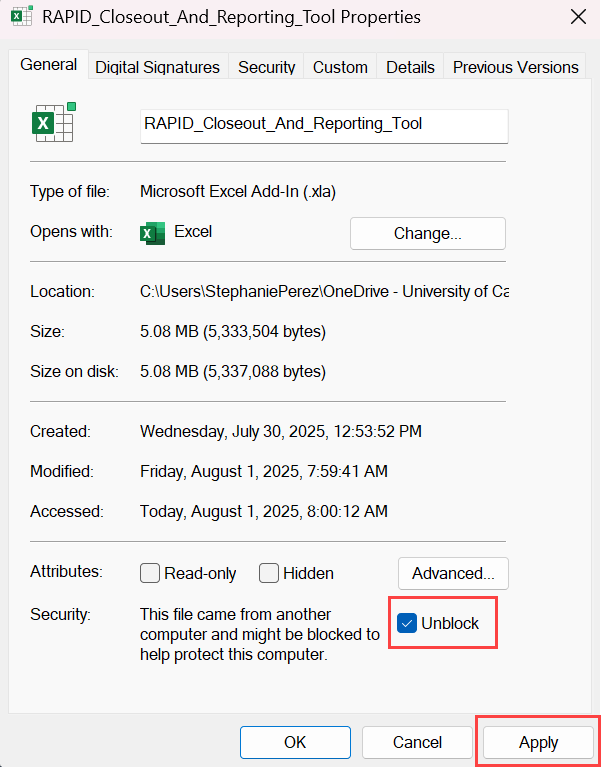
Before the RAPID Closeout Tool can be used with Excel, the .xla add-in file must be unblocked by following the steps below. Refer to the installation instructions that are available with the RAPID Closeout Tool download for more details.
- Right-click the file named RAPID_Closeout_And_Reporting_Tool and select Properties
- At the bottom of the General tab, click the Unblock button or check the Unblock checkbox
- Click the Apply button, then the OK button
If you have any questions about this new RAPID Tool version, contact your EFM accountant.
Thank you,
Katie Cadle, Manager
Extramural Fund Management