
Dear PAMS Users,
We’re pleased to share the latest updates in PAMS effective Friday, 4/17/26. For questions about this release, please contact the PAMS Help Desk at PAMSHelp@research.ucla.edu.
New Department Worklist Section: Fund Closeout Pending Department Action
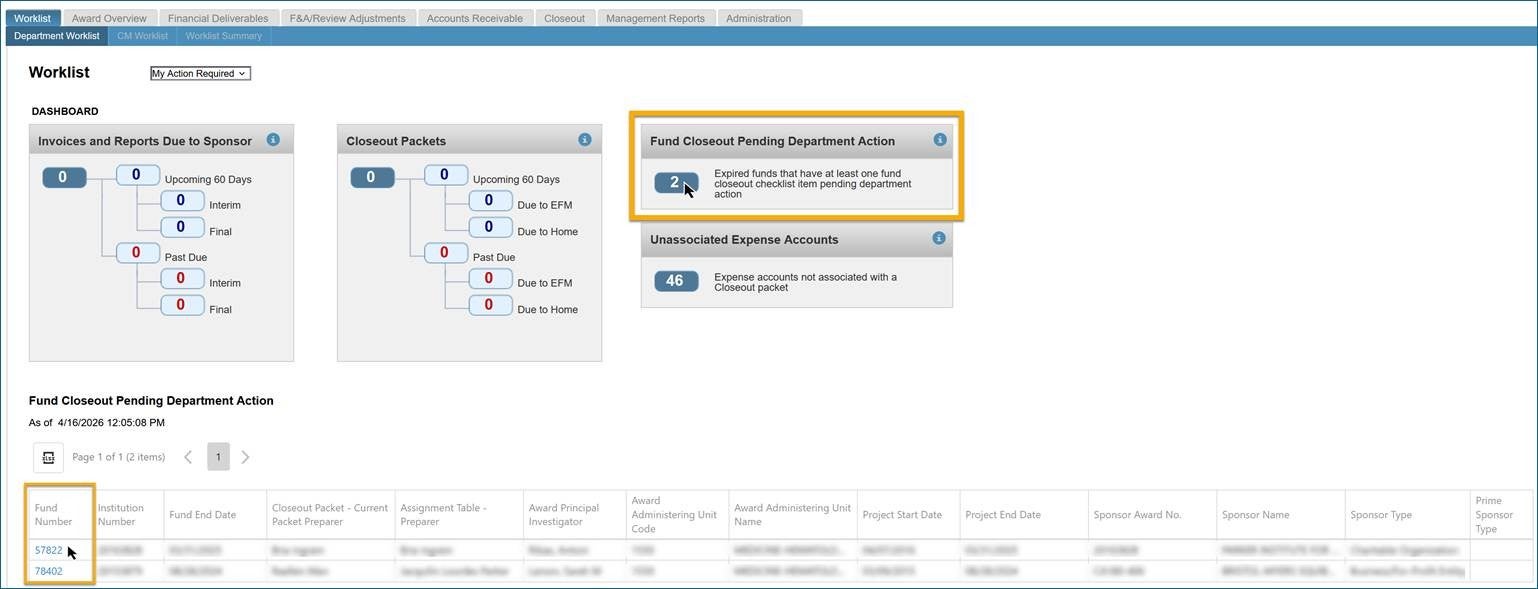
A new section is now available on the Department Worklist: Fund Closeout Pending Department Action.
This worklist provides departments with centralized visibility into expired funds that require department action before the fund can be closed (Y/N) in the financial system. A fund appears here when EFM marks at least one Fund Closeout Checklist item with a Pending Department Action status. The worklist is visible to all users within a cluster and updates in real time, allowing users to track required closeout actions. This enhancement helps reduce delays with fund closure and minimizes follow-up during the fund closeout process.
How to view required actions:
- Click the bubble count to populate the results grid
- Select the Fund Number hyperlink in the results grid to open the Fund Closeout Checklist
- Review the checklist items marked as Pending Department Action
Checklist items requiring department action:
A fund will appear on this worklist if any of the following four checklist questions are marked as Pending Department Action:
| Checklist Question | Department Action Needed |
| Have all encumbrances been removed from the fund? | Release all encumbrances and memo-liens |
| Have all applicable expenses been posted to the fund since the final submission? | Ensure all pending expenses included in the Final financial deliverable post to the ledger. |
| Have all unallowable expenses been removed from the fund? | Process the appropriate cost transfers (e.g., NPEARs, Salary Cost Transfers, Benefit Cost Transfers) to remove unallowable or inapplicable expenses. |
| Have all UCPath issues been addressed? | Continue working with UCPath to resolve any open tickets before the fund can be closed. |
Per EFM’s financial closeout procedure, departments are responsible for removing unallowable and/or inapplicable expenses, encumbrances, and memo-liens from the fund no later than 30 days from the due date of the Final to the sponsor.
How to remove a fund from this worklist:
- Complete all actions required to resolve checklist items marked as Pending Department Action.
- Notify your EFM Accountant once the required actions are completed.
- EFM Accountant will verify the updates and clear the Pending Department Action status on the Fund Closeout Checklist.

New ‘Award Processing Office’ Filter on AR Aging Summary
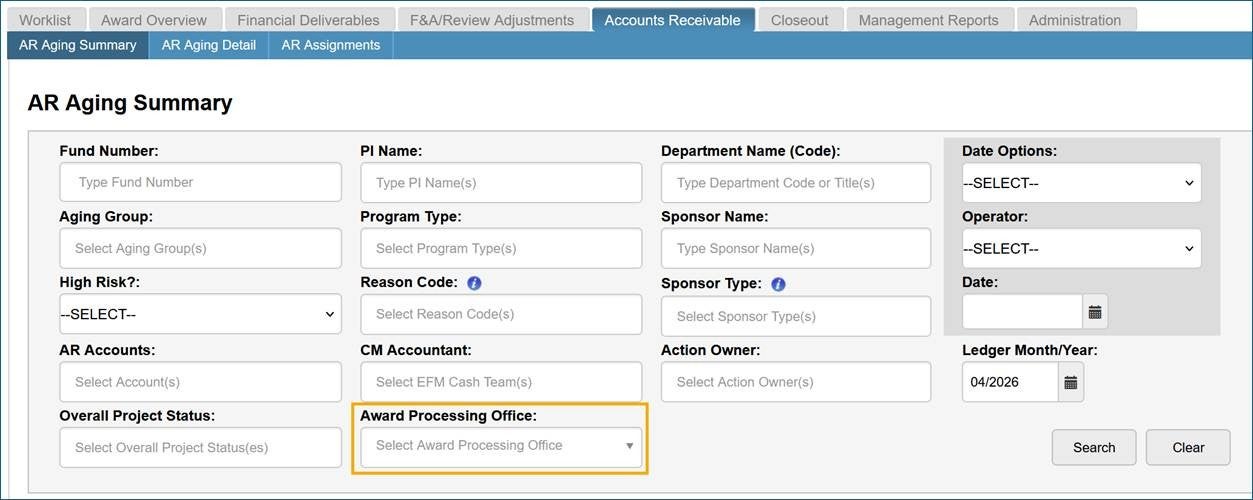
The AR Aging Summary page now includes a new search filter called Award Processing Office. This filter allows users to refine AR results based on the office that processed the award. Available options include:
- Office of Contract & Grants (OCGA)
- Technology Development Group (TDG)
- Clinical Trials Contracts & Strategic Relations (CTC&SR)
Thank you,
Stephanie Perez
PAMS Help Desk
PAMSHelp@research.ucla.edu
Phone: 310-794-0008